

What’s Working with Meta Ads for Music
Meta has the best advertising platform in the world, and has for some time.
The most reliable way to grow your audience on Spotify and other streaming platforms is with Facebook and Instagram ads. If your audience is under 30, you’ll do perfectly fine with just Instagram.
Advertisers have been complaining about the gradual loss of manual control and targeting options. Soon you’ll be able look at an object while wearing your Meta glasses, say “hey Meta, sell this,” and it’ll do the rest.
Does it matter that you can no longer target fans of obscure bands or limit your ads to running only on Instagram Stories to females age 21-24 from 2-4 am on Wednesdays? Not to me!
I’ve been asked countless times for a screen-by-screen walkthrough of my campaign creation process. My usual excuse is that Ads Manager changes every 10 minutes, so anything I post will be obsolete tomorrow. That’s still the case, and also keep in mind that your Ads Manager probably looks different than mine to begin with.
Along the way, I’ll share my thoughts on the various opportunities and pitfalls presented. If you’d rather just read about my latest album promotion, skip to the next heading.
We’re going to be building a conversions campaign that directs users to a landing page, like this:
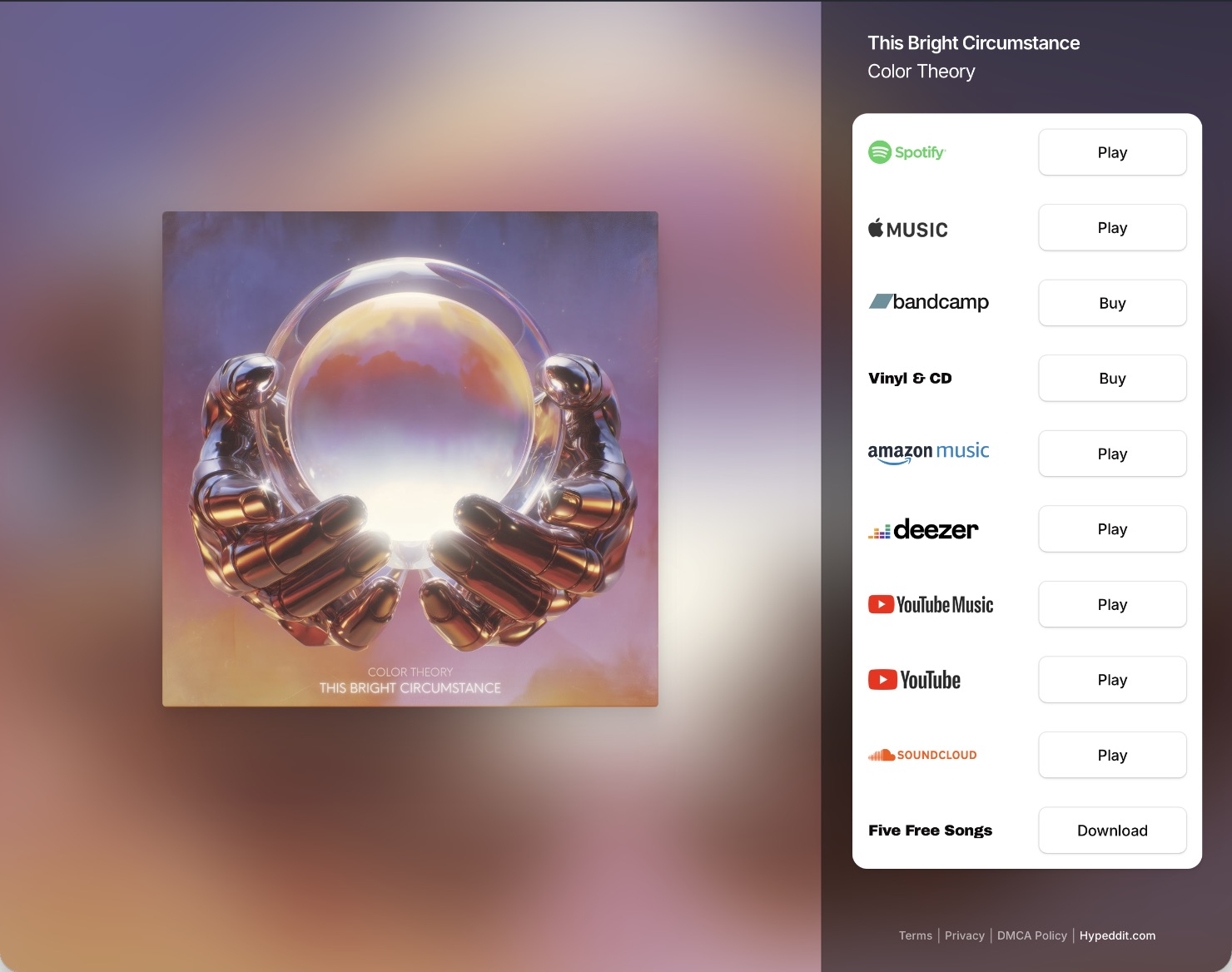
You don’t have to list that many options. Just Spotify and optionally Apple Music are perfectly fine for our purposes here.
I’m going to trust that you can create the smart link yourself. You’ve got plenty of options for hosting it, including Hypeddit (seen above), Feature.fm (more features, more expensive), and SubmitHub Links (totally free).
I’m also not going to walk you through setting up your Meta Pixel or creating a Custom Conversion in Events Manager. I’m pretty sure the latter isn’t even necessary anymore, at least with Hypeddit, which I’ll be using in this example.
With that said, let’s get this show on the road!
Meta Ads for Music Campaign Creation
Start by opening up Ads Manager and hitting the green + Create button below “Campaigns.”
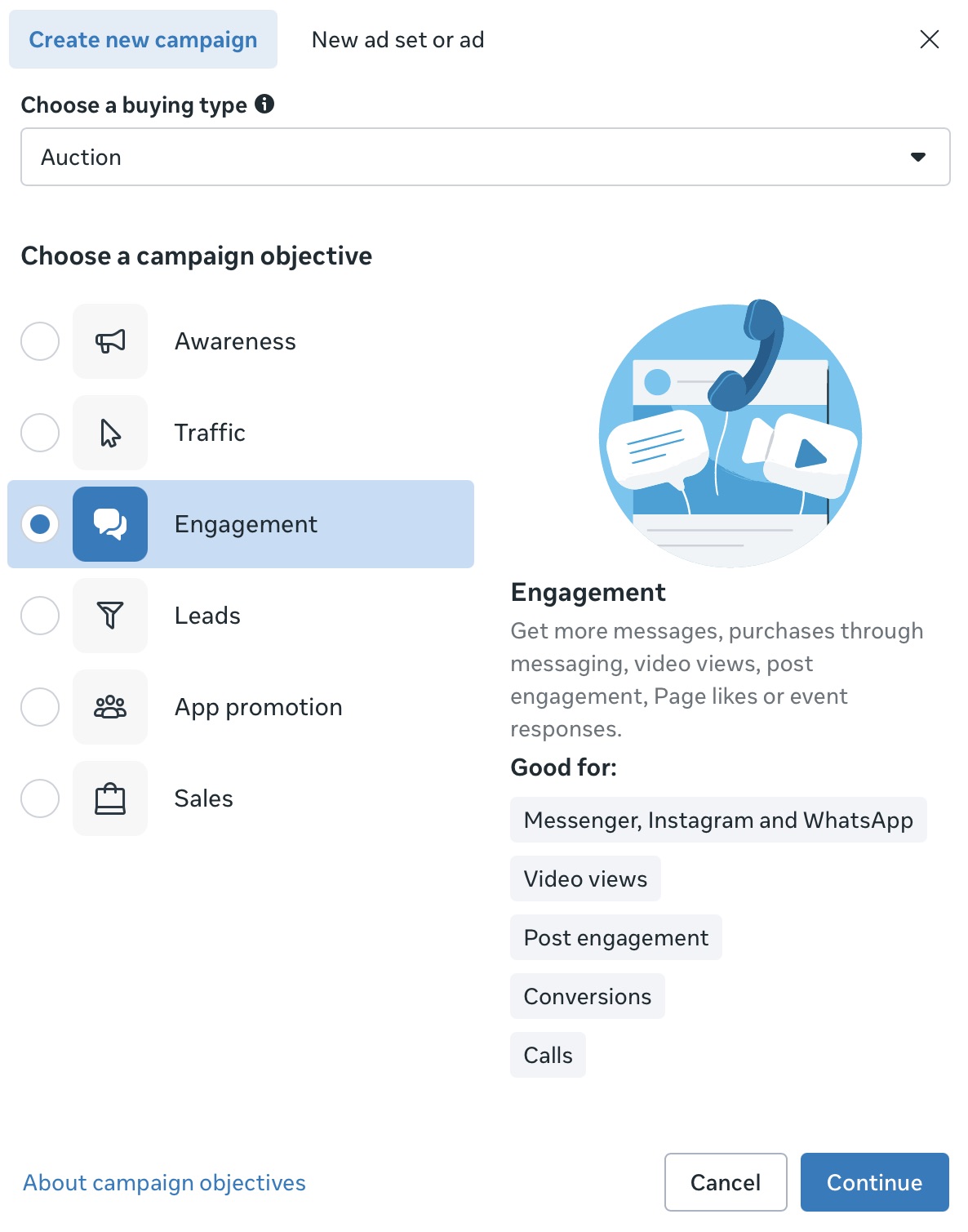
We want Conversions, which falls under the Engagement objective.
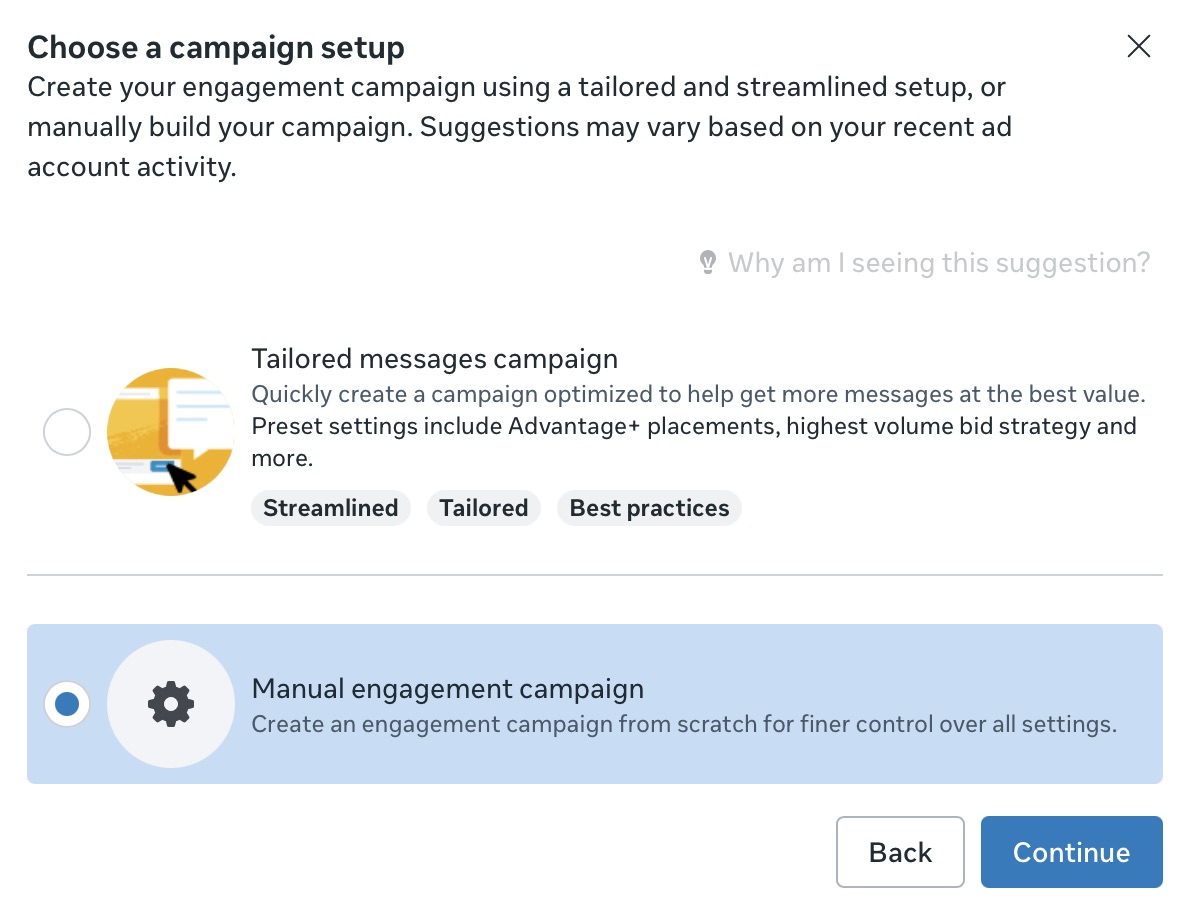
Immediately we’re hit with the first of many “Meta knows best” prompts that we have to bypass by selecting “manual.”
Next we’re presented with our full campaign structure: Campaign, Ad Set, Ad.
The only things you need to mess with at the campaign level are the name and daily budget. I like to name my campaigns with a single letter for the campaign type (“C” for conversions), followed by the name of the song.
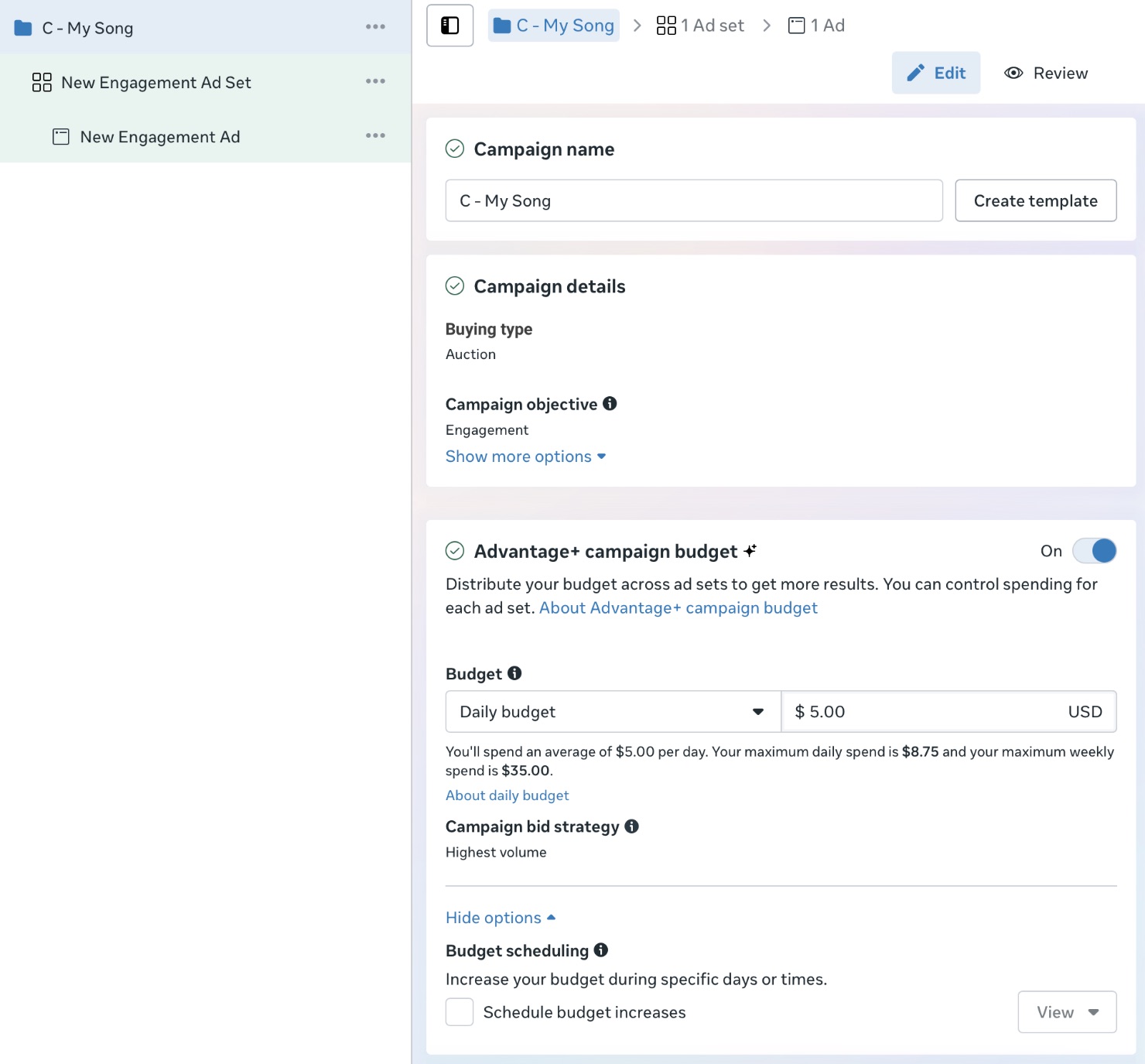
Hit “Next” and we move on to the ad set.
Here’s where things get interesting! Let’s hold off on naming our ad set until we’ve nailed down the targeting.
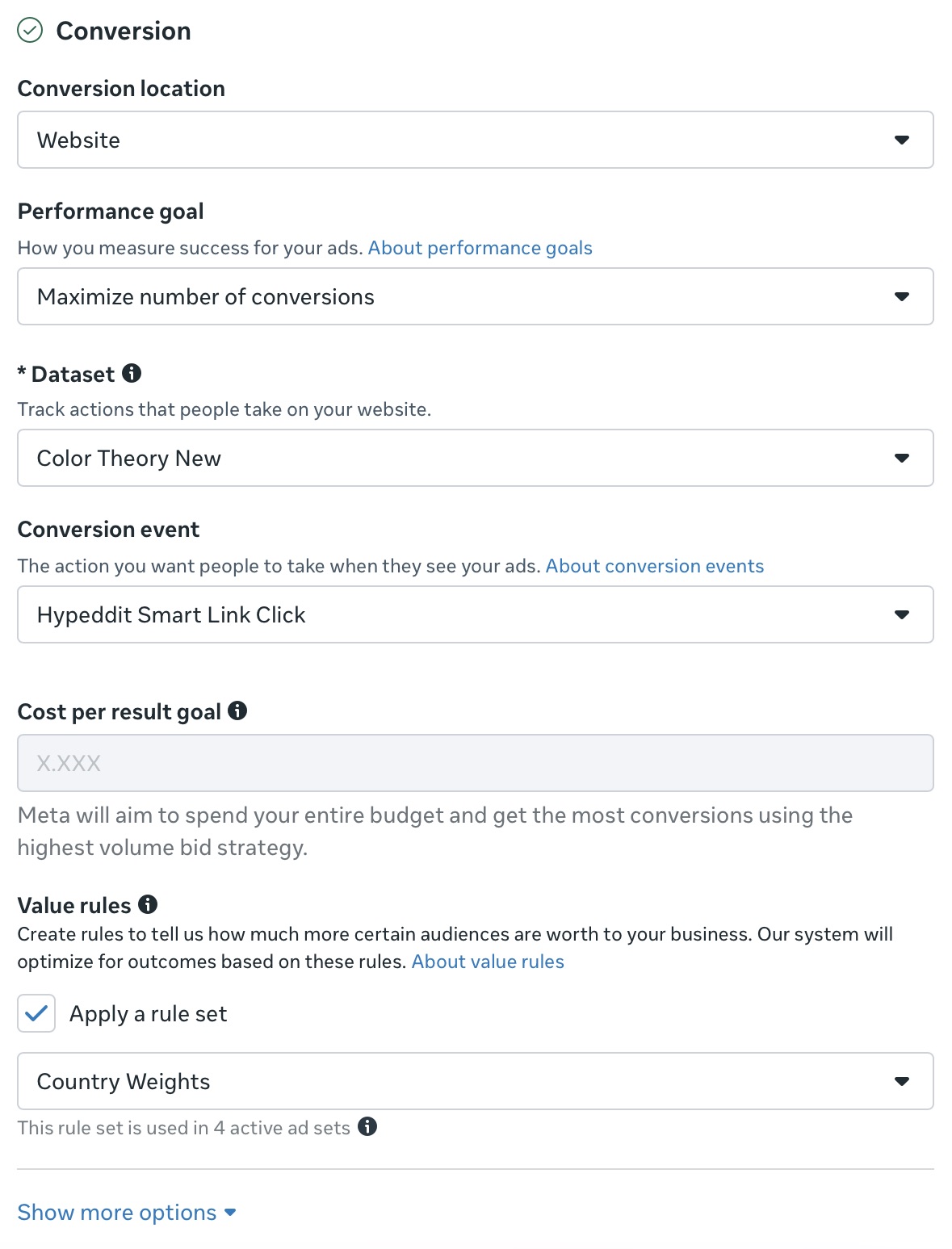
Select “Website” from the Conversion location dropdown and the rest of the fields will appear. Dataset is apparently their new term for Pixel. This is the first time I’ve seen it!
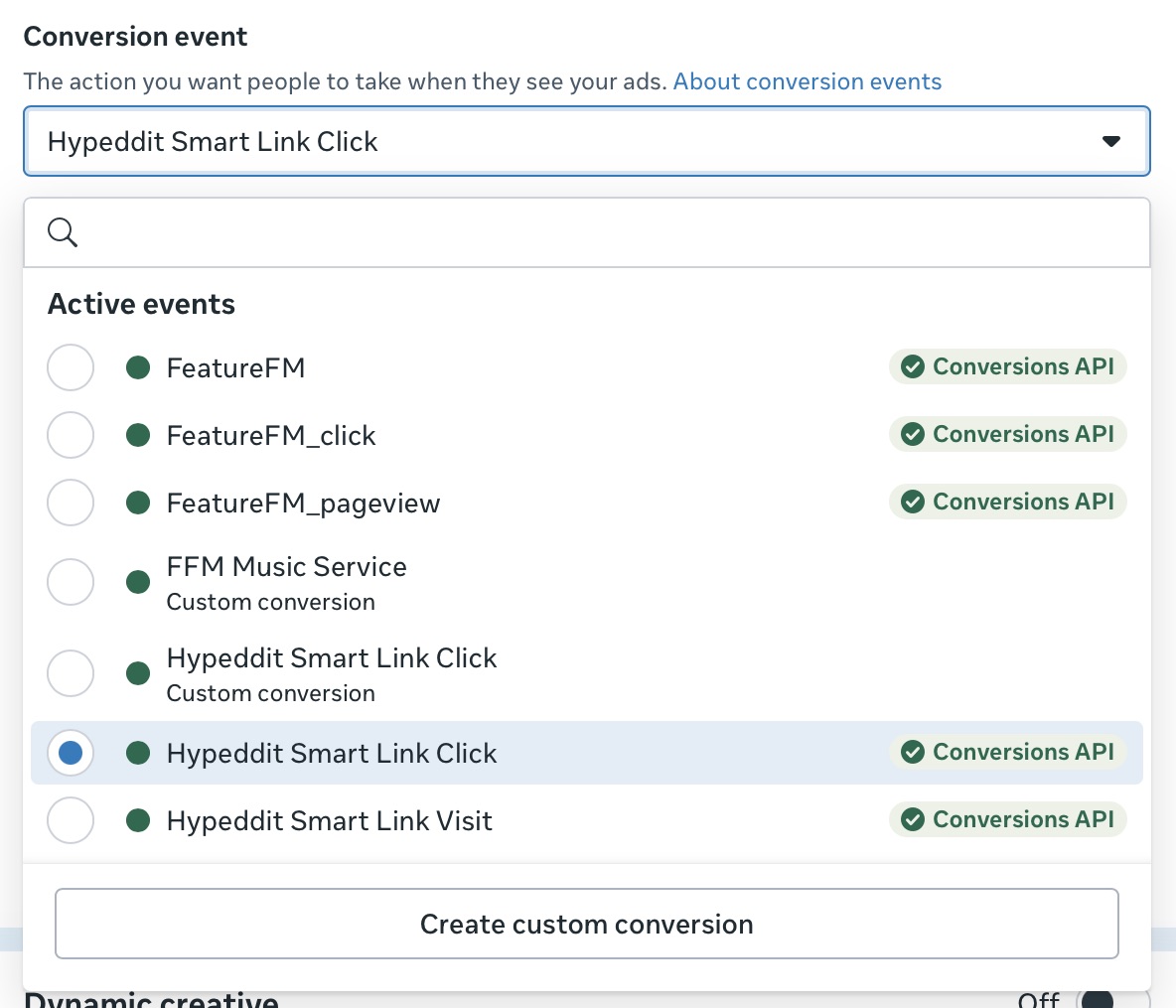
If you’re using Hypeddit, the Hypeddit Smart Link Click should be available, assuming you’ve entered your Pixel data and tested clicking on a link so Meta can see it. I also entered my Conversions API access token into Hypeddit at some point in the distant past, which is presumably why it has the green check.
You set up Conversions API access in Events Manager, under Data Sources. That’s different than a Custom Conversion, which again you probably don’t need to worry about.
Rest assured that getting to this point is the hardest part! Once you get your conversion event to show up in the dropdown, the rest is cake.
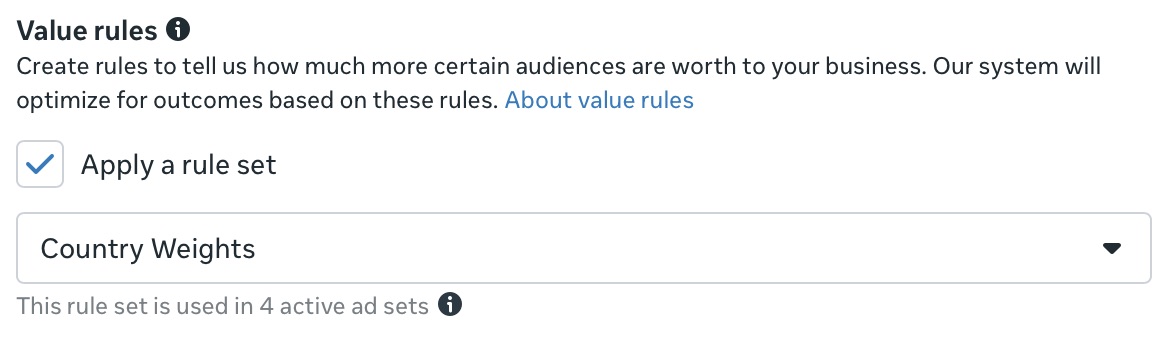
Then we’ve got value rules, which I wrote about recently. Totally optional, but if you leave things as-is, most of your conversions will likely come from Brazil, Mexico, and Malaysia if you adopt my country list.
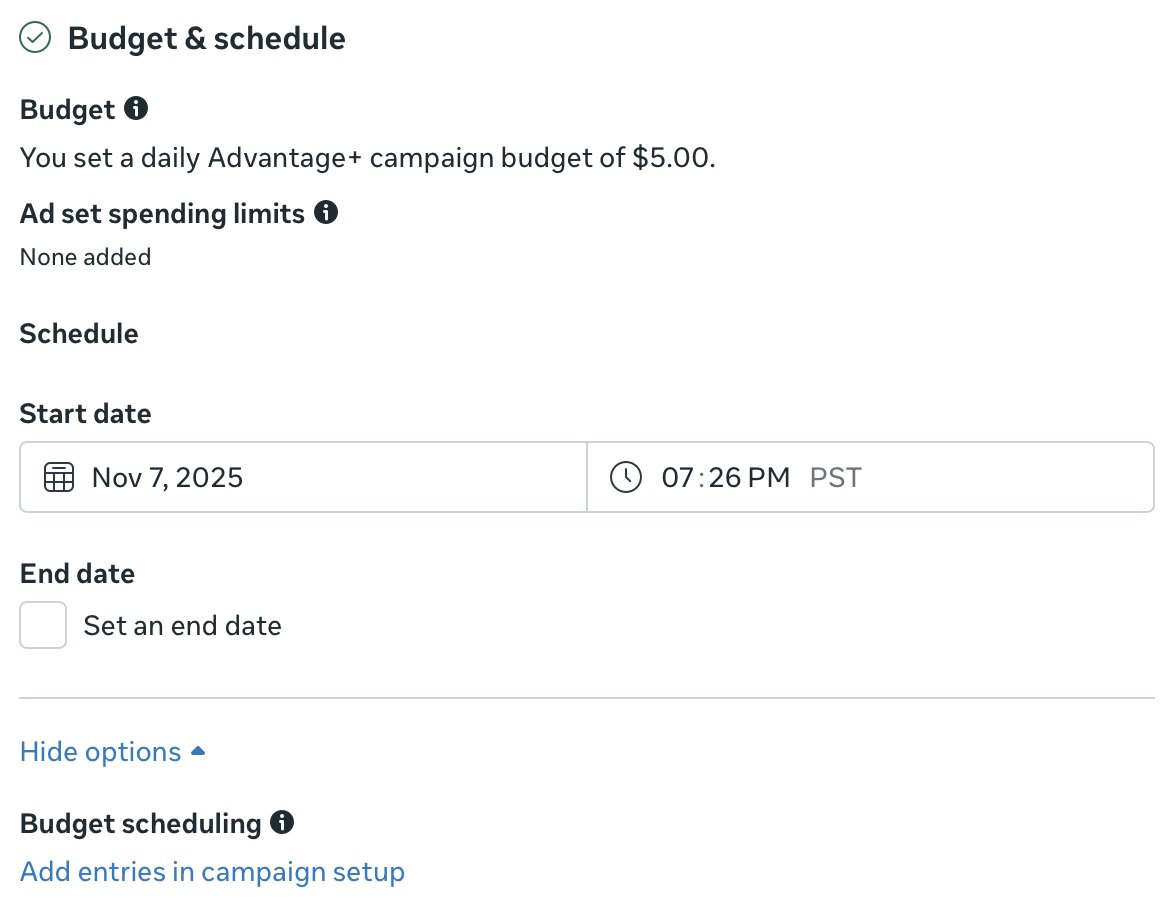
There’s nothing to do here because we enabled “Advantage+ campaign budget” in the previous step. That means Meta will allocate budget to the ad sets that perform the best and starve the losers.
But that doesn’t apply to us, because we’re only going to use a single ad set.
Why? Because targeting is dead. As I’ve heard said many times, the creative is the targeting.
John Gold of Hypeddit told me about an experiment he ran:
He created a campaign with 84 ad sets, each with a single ad, and allocated $3 to each.
Then he created another campaign with the same 84 ads piled into two ad sets (there’s a limit of 50 ads per set).
Both campaigns converged on the same winning ad.
The only difference is that the one where he manually allocated the budget spent a lot more to get there.
Historically I’ll leave interest targeting blank, or just Spotify, or Spotify and Apple Music. It really doesn’t matter. Meta will sort it out.
If you haven’t run these types of ads before, pointing Ads Manager in the right direction with some broad genre targeting may speed things up and certainly won’t hurt!
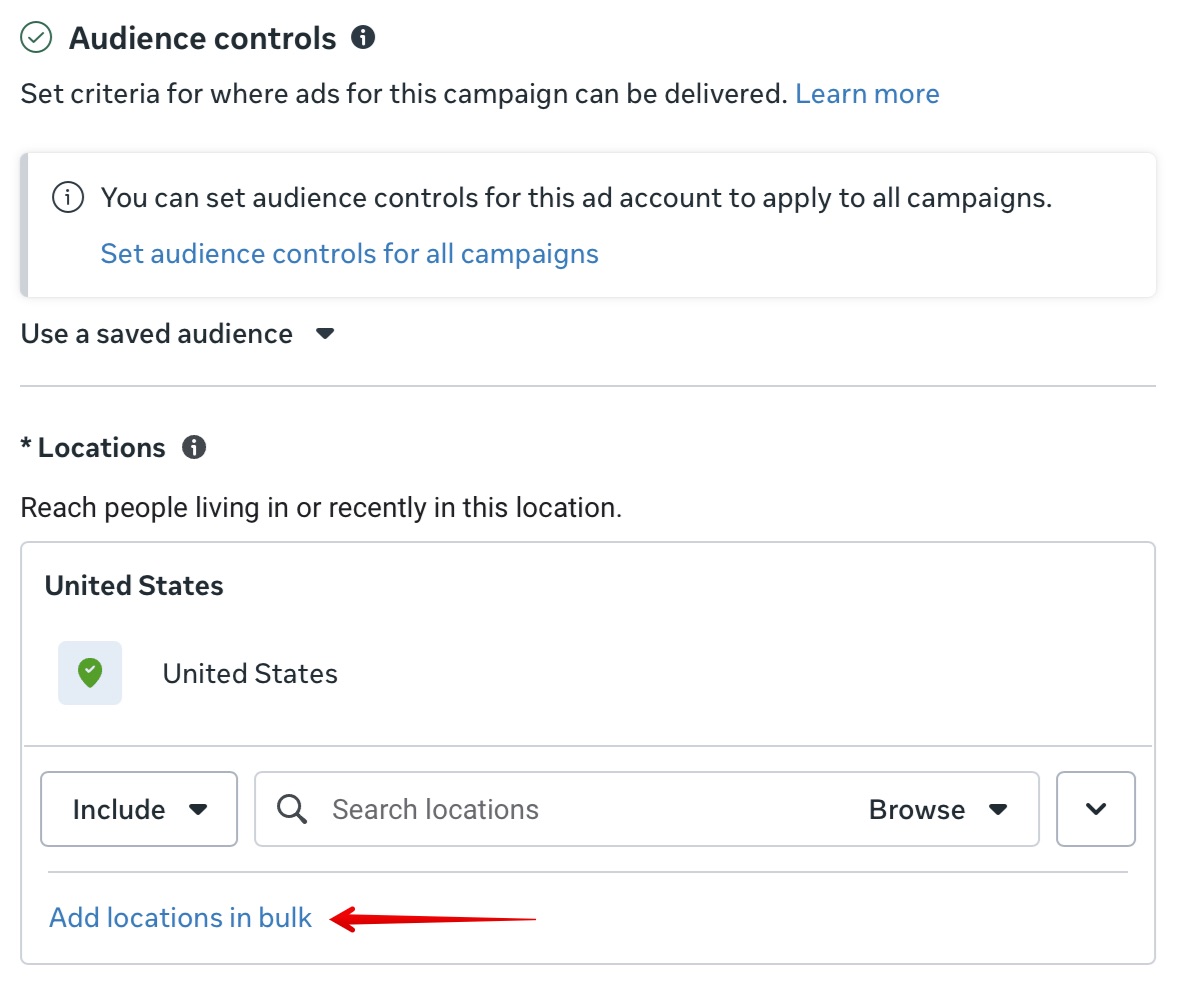
It defaults to just the US, in the US anyway. If you want to use my list of Tier 1 and 2 countries, click “Add locations in bulk,” select Countries from the dropdown menu, and copy/paste this list of 34 countries:
Austria, Australia, Belgium, Brazil, Canada, Switzerland, Cyprus, Czech Republic, Germany, Denmark, Estonia, Spain, Finland, France, United Kingdom, Hong Kong, Ireland, Iceland, Italy, Japan, Luxembourg, Latvia, Monaco, Malta, Mexico, Malaysia, Netherlands, Norway, New Zealand, Poland, Portugal, Sweden, United States, South Africa
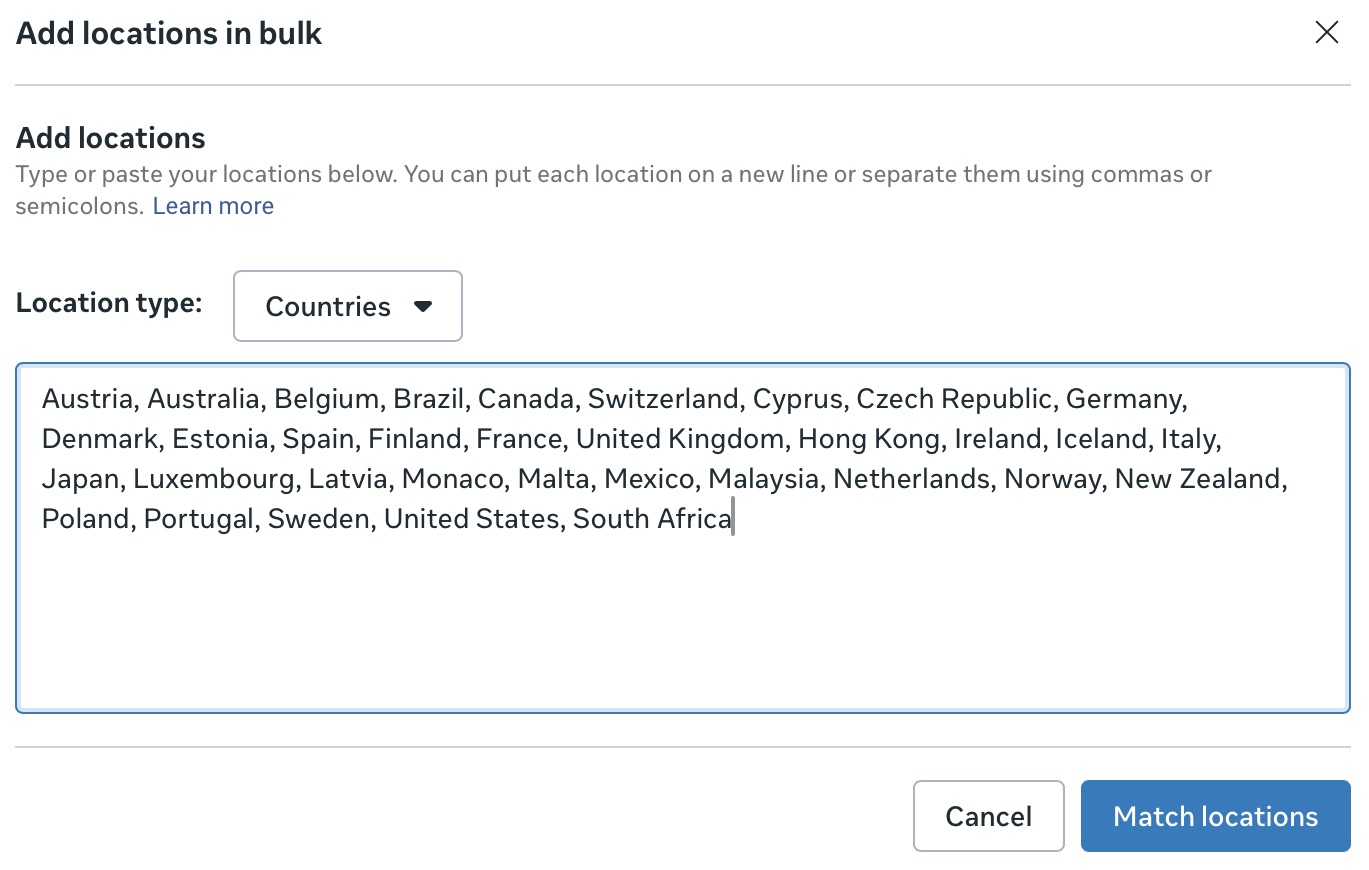
And click on “Match locations.”
It should come up with 42 locations, which you can simply add, or if you want to keep your list tidy, you can to delete the 8 offshoots like United States Minor Outlying Islands, Netherlands Antilles, French Southern Territories, etc.
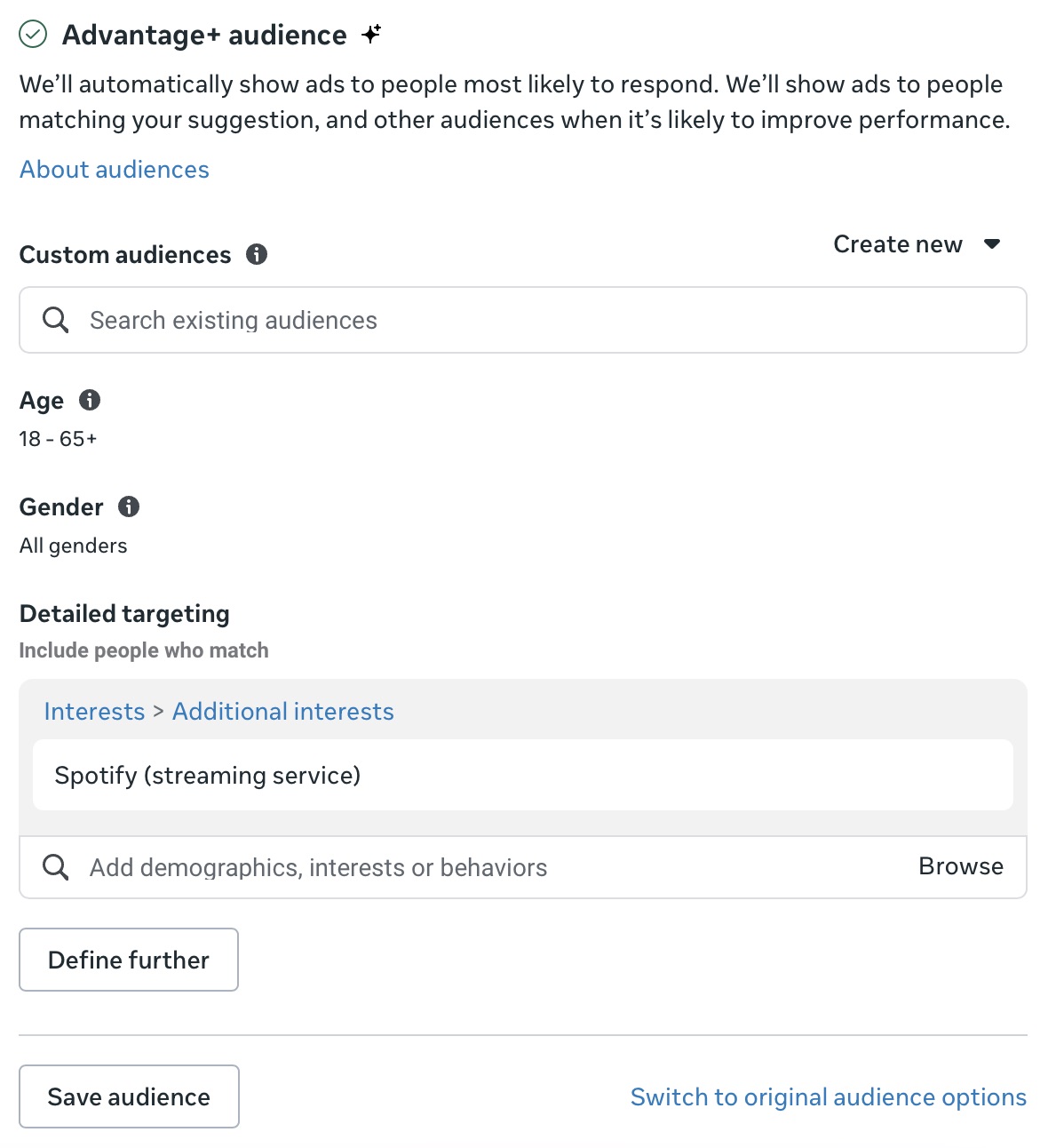
Most people in the music promotion space will tell you to “Switch to original audience options” and target specific artists/bands or at least genres.
I really don’t think that’s necessary. I’ve been using Advantage+ audience for at least a year, after testing it and finding it performed at least as well. It’s only gotten better since then!
That said, you could absolutely considering lowering the age from 65+. I’ve been using 64 for reasons I’m now unsure of.
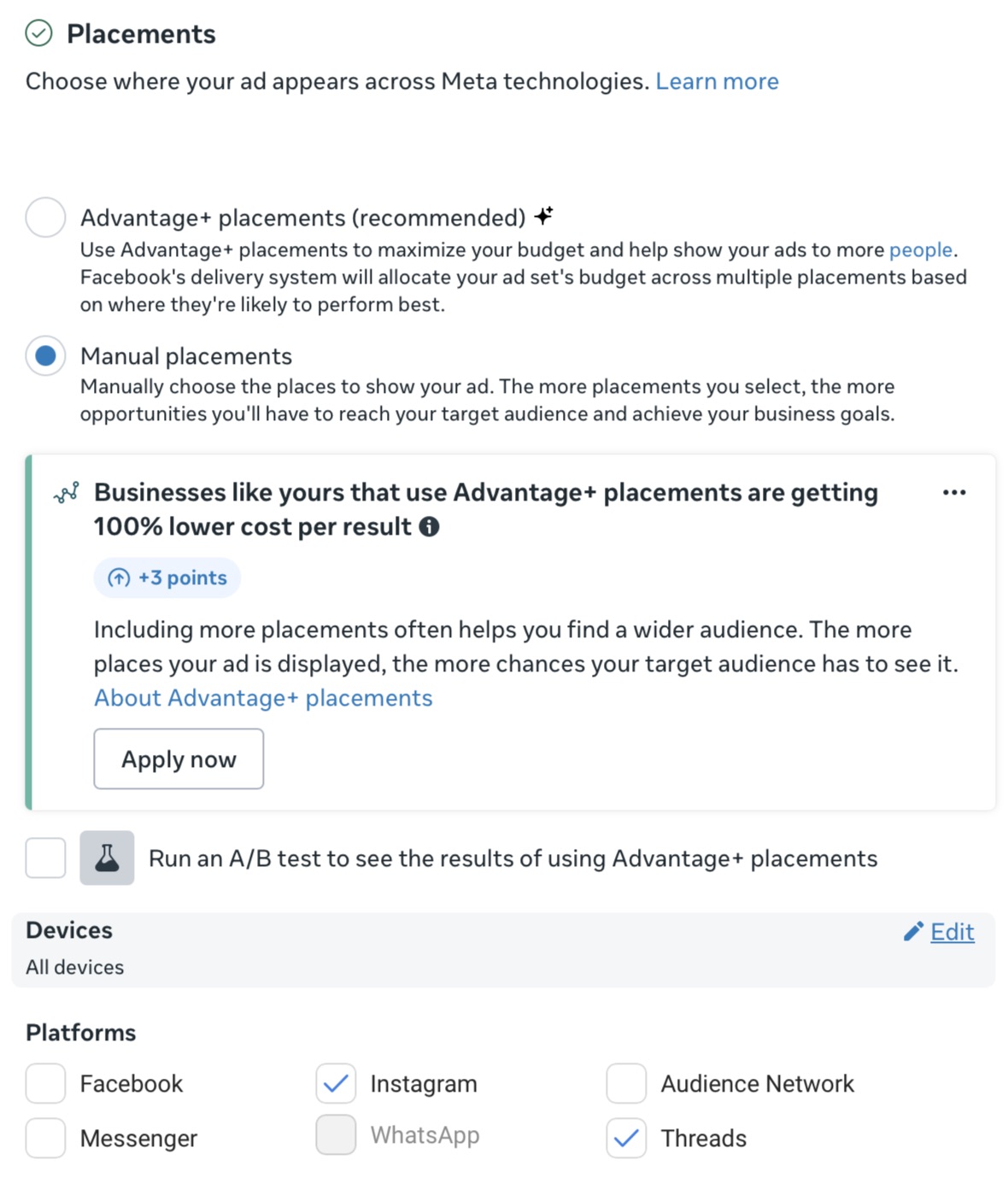
For placements though, you’ll want to override Advantage+ by selecting edit, “Manual placements,” and deselecting everything but Instagram, and optionally Threads.
I’m not seeing many conversions from Threads but the cost per impression is cheap and it doesn’t seem to be hurting anything.
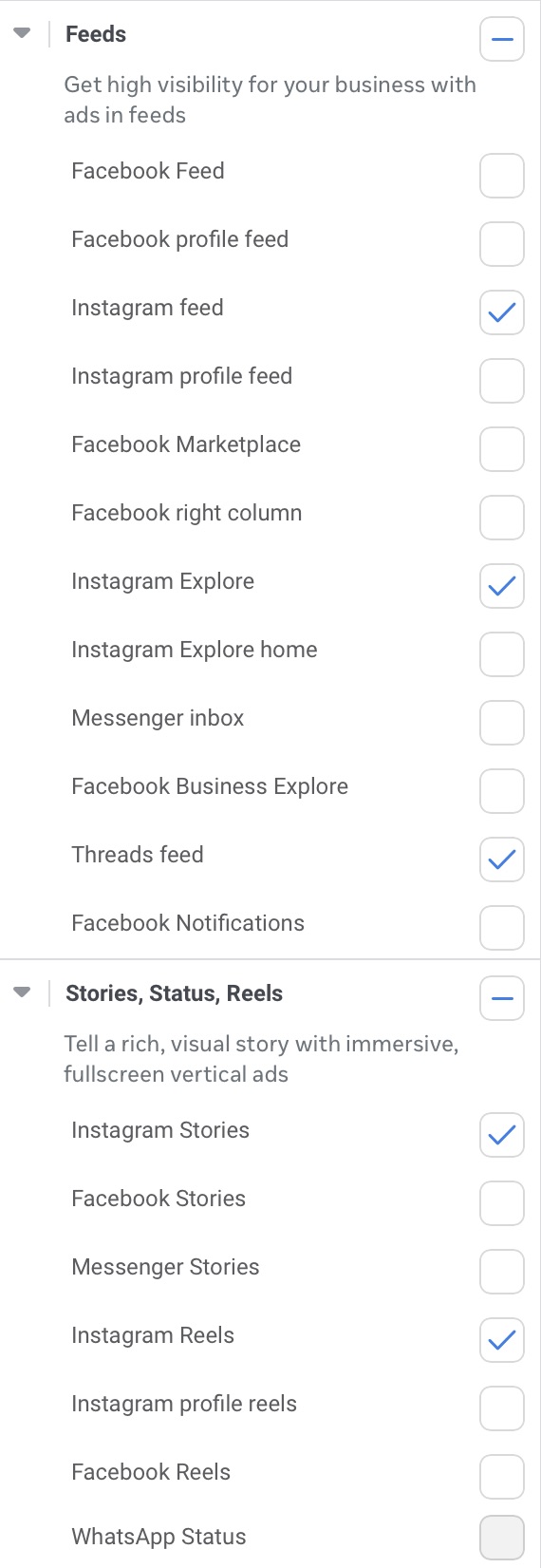
As for the actual placements, I’m using five: Instagram feed, Instagram Explore, Threads feed, Instagram Stories, and Instagram Reels. The lion’s share of conversions comes from Instagram Reels.
While you might technically get a lower cost per conversion by letting Meta handle placements, these specific placements are more likely to lead to actual streams of your music.
When I add Facebook placements, my cost per conversion reliably drops, sometimes precipitously. Is it due to bots? Accidental clicks? I don’t know, but typically I don’t see any improvement in Spotify for Artists. If you want to add additional placements, do so carefully and methodically.
After the ad set is fully configured, I’ll go back and name it in a way that encapsulates my settings, like “Spotify 18-64 T1-2 CW IG.”
Next up, you create the actual ads.
These should be 15-20 second 9×16 videos (1080 by 1920 pixels) that showcase at least three different parts of your song. I’ll provide some pointers and examples later on.
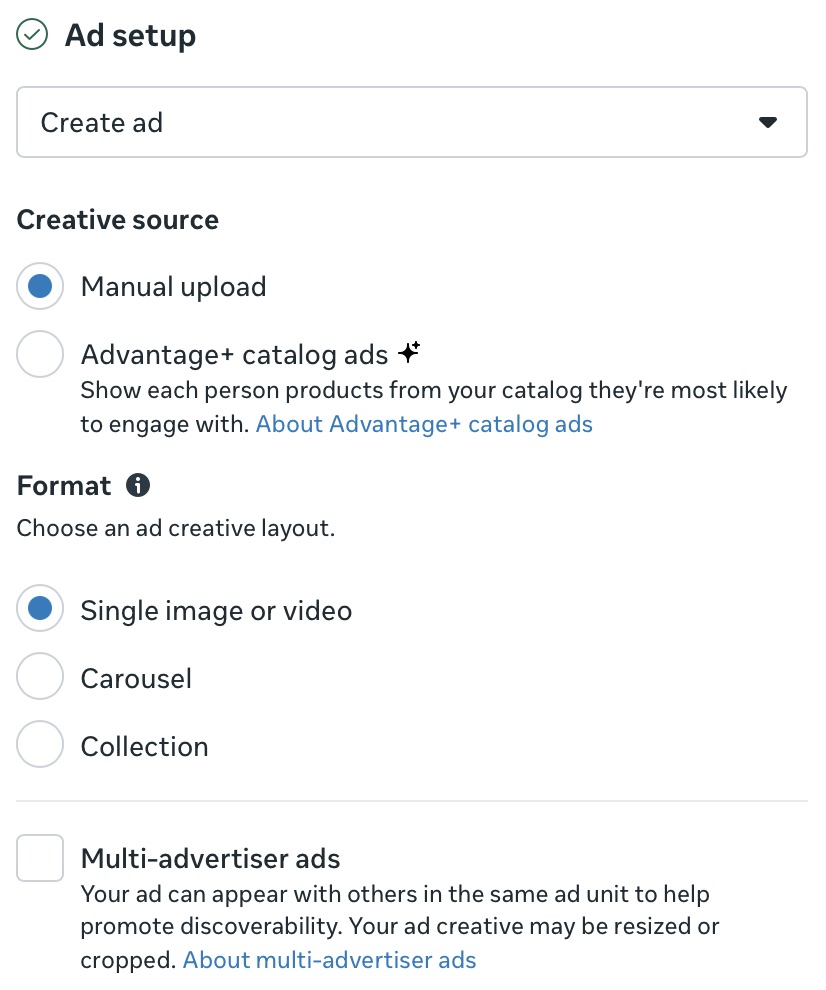
Name your ad, select your accounts in the Identity section, and under Ad setup, select “Manual upload” and “Single image or video.”
There are a lot of options here and I won’t go into every one, but as a general rule, you have to actively fight against their recommendations, which are automatically enabled.
For example, Ads Manager will automatically add music from their library to an image ad, even if the ad itself is a post on Instagram where you added your own music. It’s frustrating and deceptive to the user.
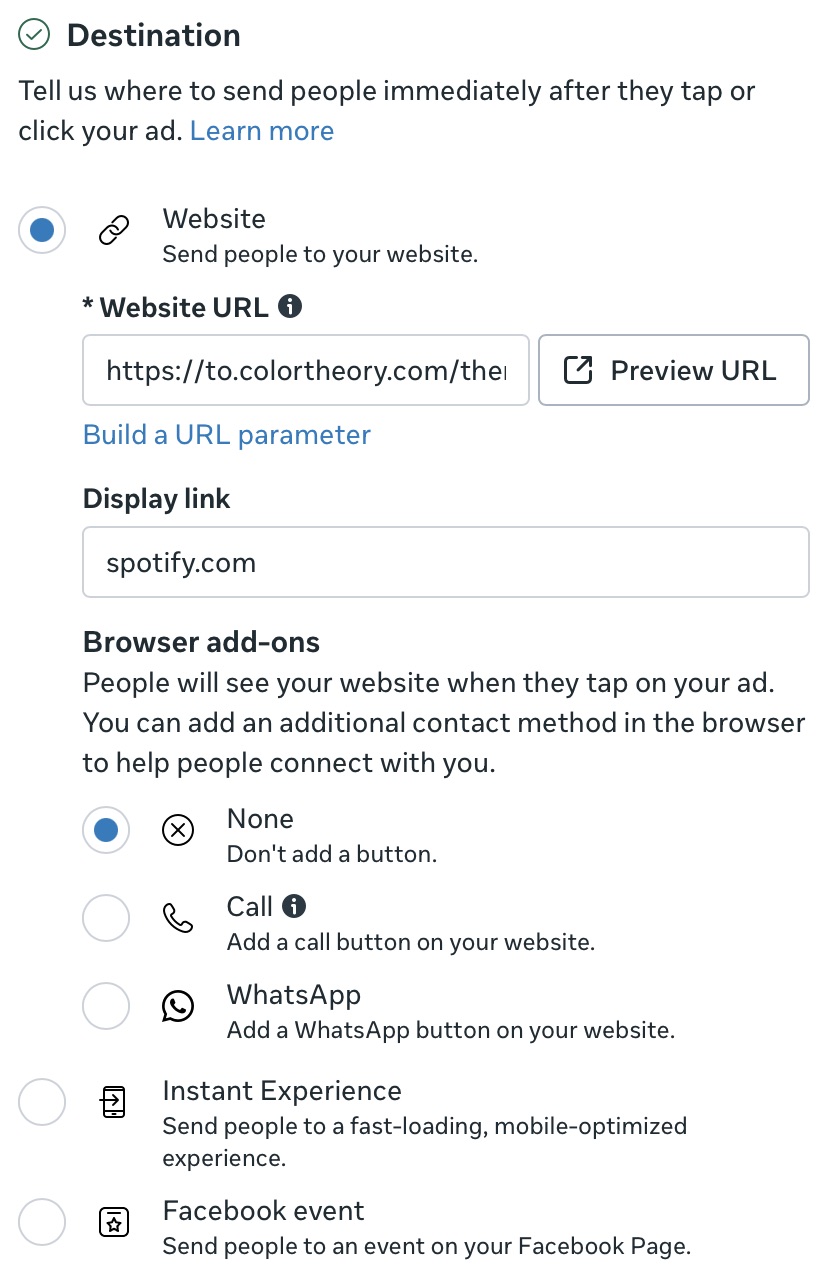
The website URL is your smart link, and I like to use spotify.com as the display link. Even though the ad doesn’t take the user directly to Spotify, they likely don’t know what Hypeddit is. I don’t think the display link is shown with the placements we’ve selected anyway, but it is in the Facebook feed.
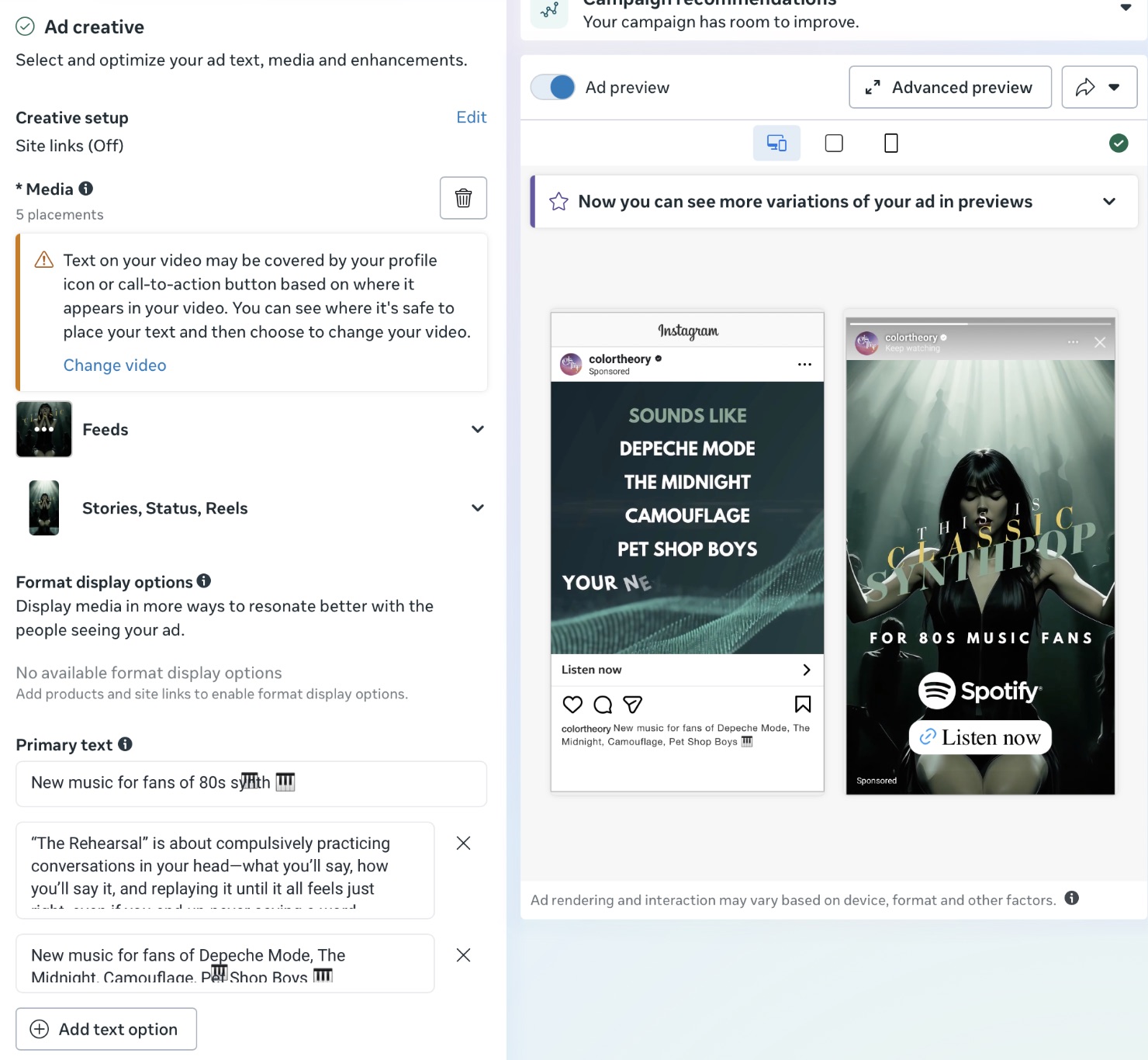
Add your video and come up with some primary text options and headlines. These only matter for feeds, so don’t stress too much about it. Select “Listen now” from the Call to action dropdown menu.
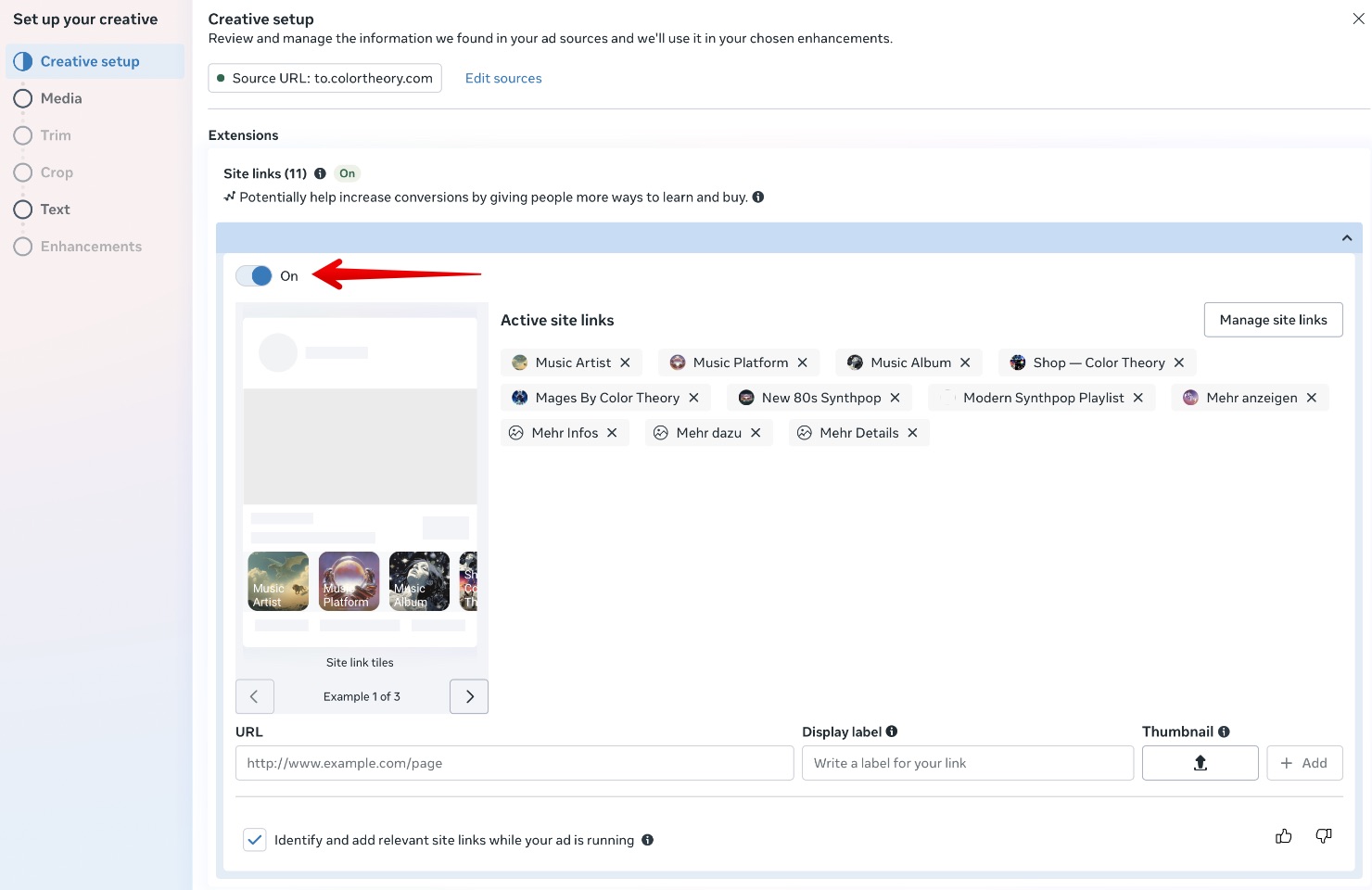
When you upload your video, it will present you with a series of Site Links, which it scrapes from your destination URL. Click the pencil icon and then flip the radio button to turn them off, as shown.
Upload your video, wait for it to process, select it, and skip the trimmer if it’s longer than 15 seconds,
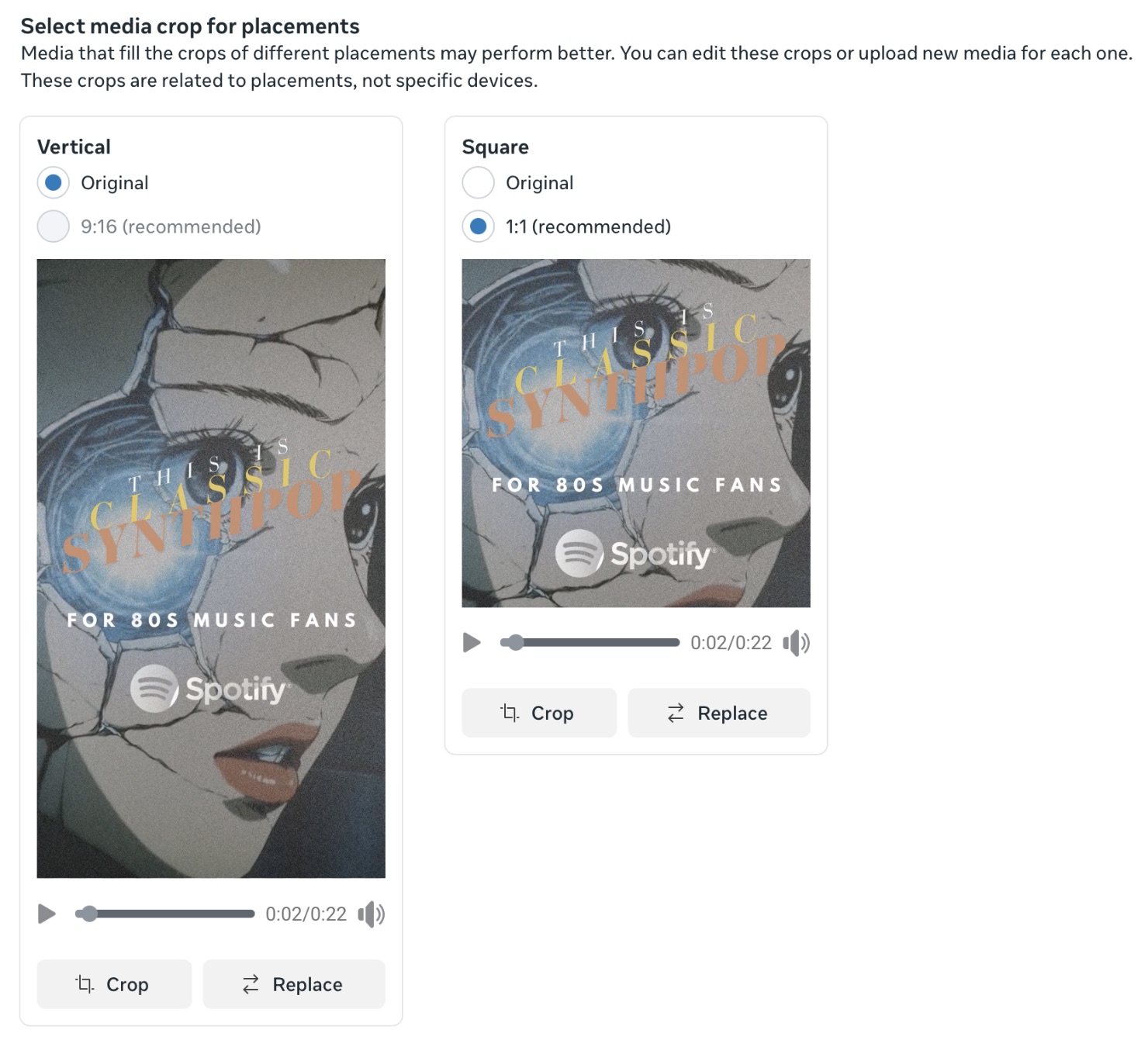
I create my ads so that they work when cropped to square, so the video takes up more space in feeds.
You’ll then be accosted by a slew of AI enhancements, which I recommend disabling. That said, I haven’t tested each of them individually. You never know.
Meta will also offer AI-generated text which you can take or leave. Most of it is cringe-worthy, but I’ll begrudgingly confess that one of its suggestions performs well: “80s Synth Revival.”
There are a bunch of other potential ins and outs, but that’s the meat and potatoes of it.
Once you’ve got an ad you like, click the three dots and “Quick duplicate” to swap in your next video, and don’t forget to turn off the newly enabled site links and AI enhancements.
Then, when you’ve created all your ads, make one final pass to ensure that all of that junk is fully disabled before hitting publish.
My Meta Ads for Music Results
My new album came out on October 17.
I had 181K release day saves on Spotify thanks to Rise, which created a massive spike in my data, so I’m going to focus on October 18 through November 7, which is the last day for which I have complete results.
Here are all the Meta campaigns I’ve run during that period:

Yeah, it’s messy. Here’s why:
I started by reviewing all the song campaigns for the singles from the album, and settled on four winners: Flavor, The Rehearsal, Where Tigers Are Said to Roam, and Undone.
I created new campaigns for each, using the winning ads from the previous campaigns, plus a few new ideas. Most of the new ads came from Kashie (read my review here), but none of those beat out my old standbys.
I also created a matching campaign for When I Can’t Remember You, the focus track of the album by process of elimination. It was the only one I hadn’t already released as a single.
I ran those at $15/day for about a week, then created a single campaign (C – TBC) to house the best ads from the five campaigns, and disabled the rest.
I’ve been running that campaign at $60/day ever since. It’s a lot of money for me, but hey, it’s not every month you release a new album.

For once, I didn’t actually practice what I preach in regard to using a single ad set. I thought I’d throw meta a curveball with this interest targeting:
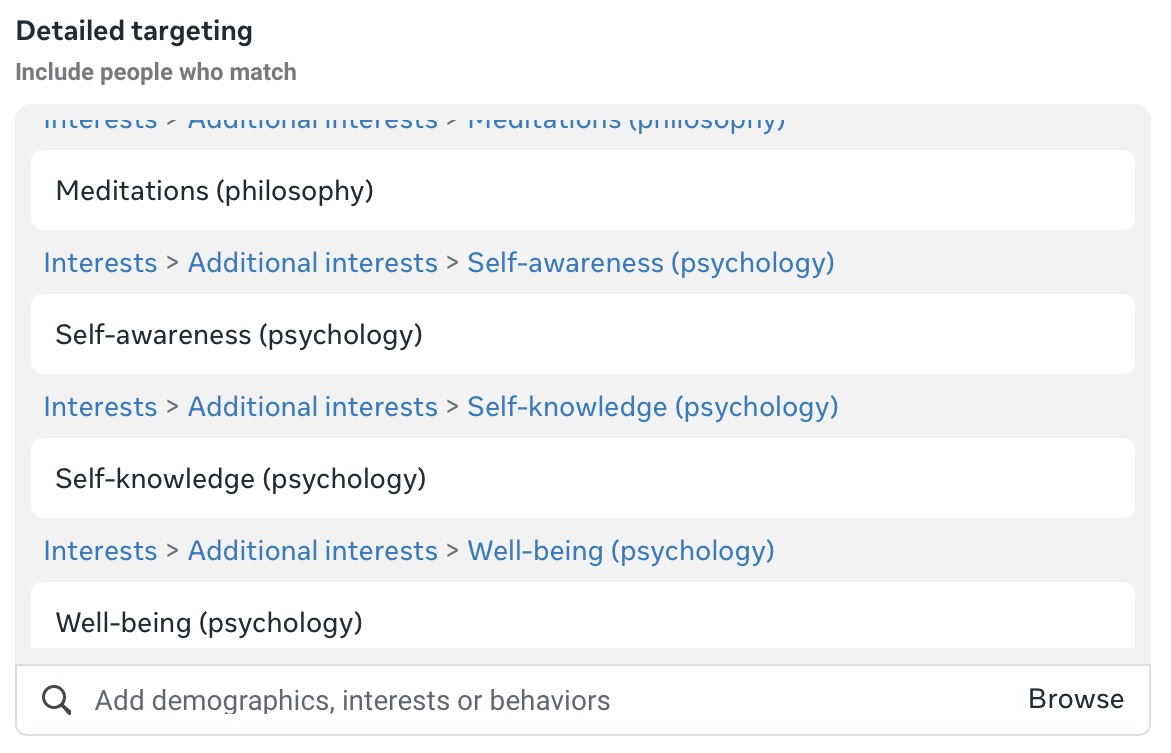
It more or less matches the theme of the album. Notice there’s nothing remotely related to music!
And yet, that ad set beat out the one with Spotify as an interest target. To me it demonstrates that Meta will end up in the same place regardless of where you start.
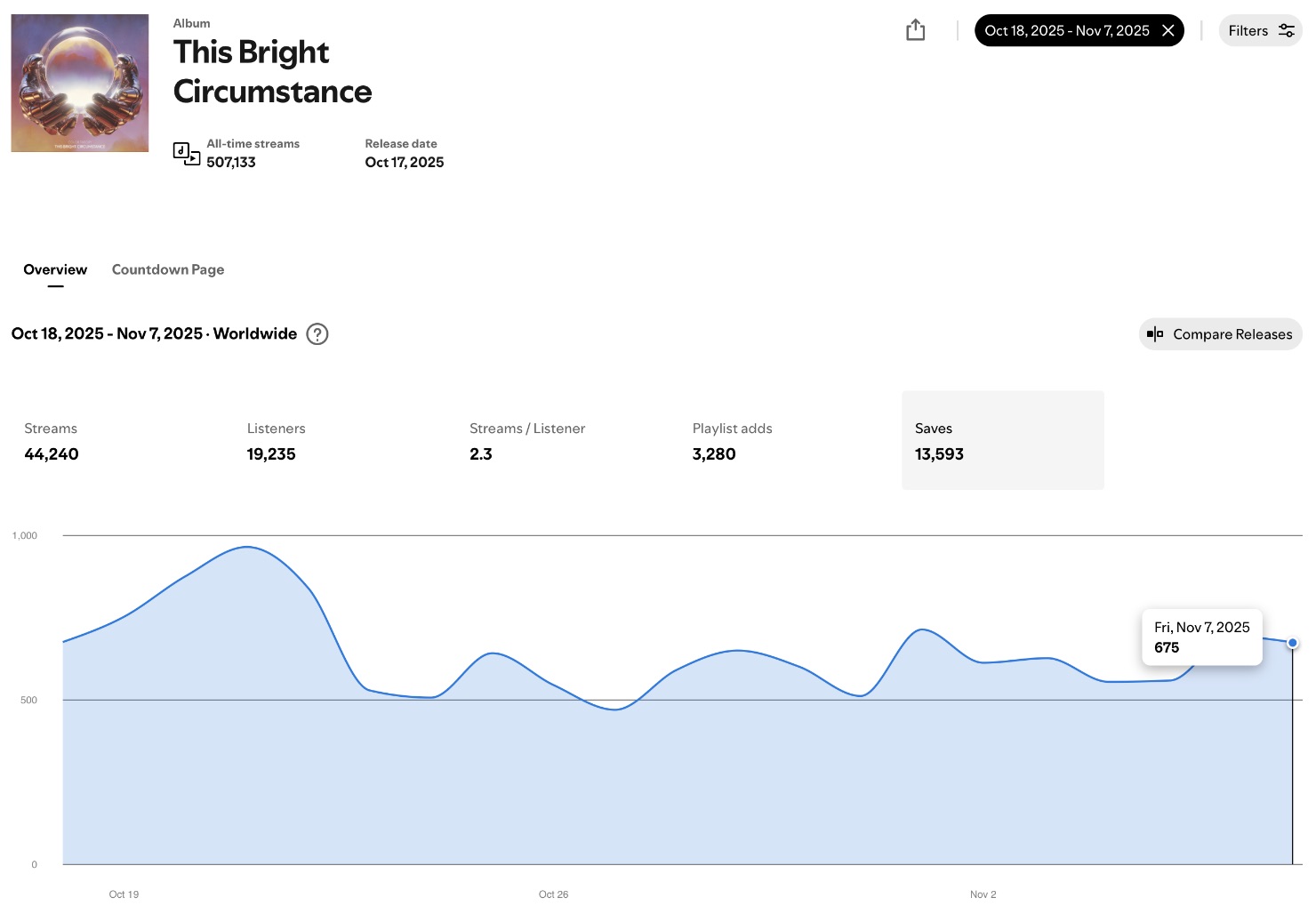
Here are my results in Spotify for Artists. I’ve chosen Saves as the metric to watch because it’s closely tied to ad spend. Turn off the campaign and saves plummet.
On average, I’m getting 675 saves a day, divided by 12 tracks means that 56 people are saving the album.
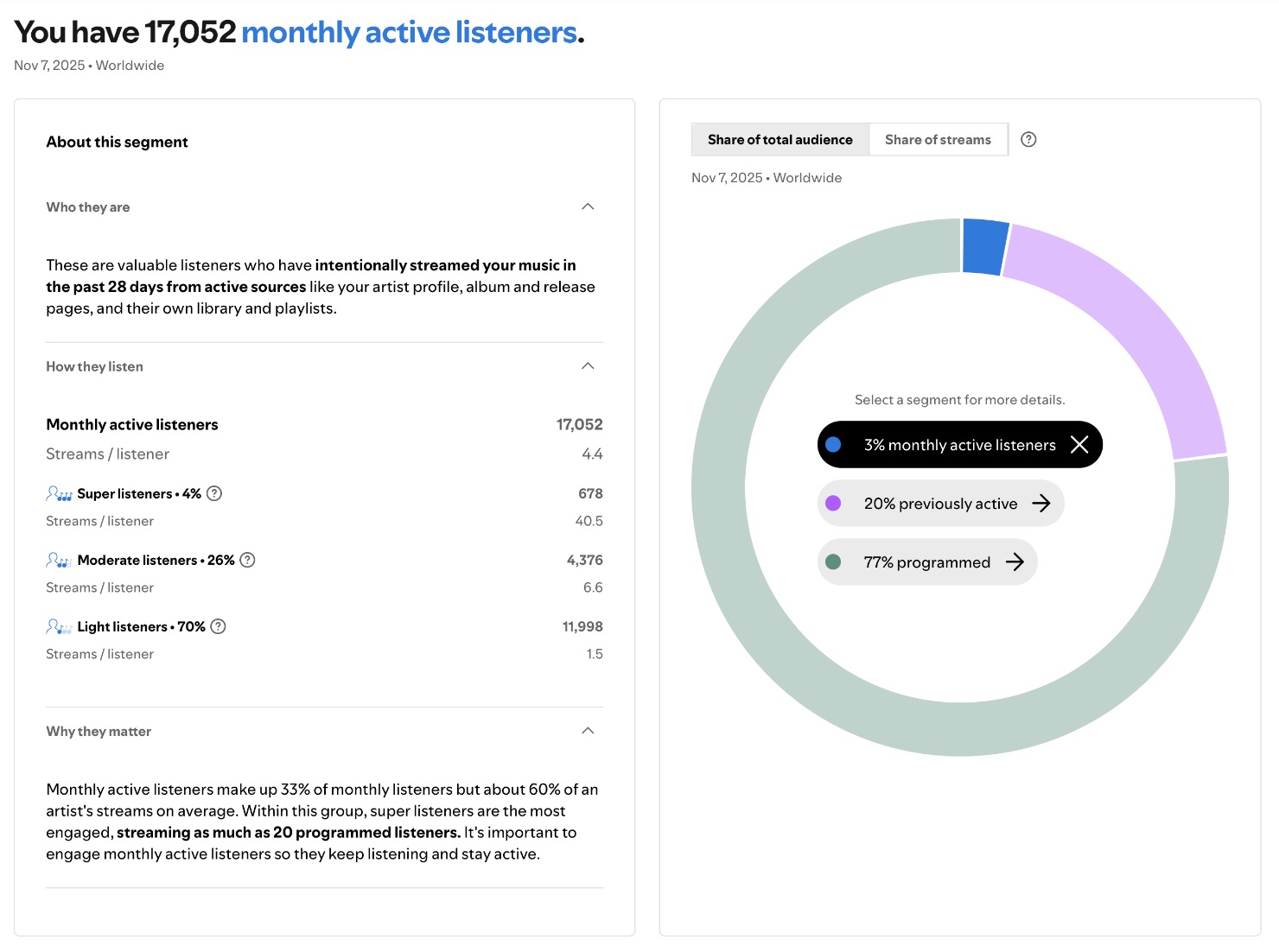
Over that same period, my monthly active listeners have gone up by 900. It’s not just from Meta ads though. I’m also running Showcase campaigns, which I’ll write about soon!
I can’t afford to keep going at $60/day for much longer, but I’m hoping that listeners will revisit the album enough to make the campaign pay off in the long, long long run.
Last but not least, here are my top two ads. I not-so-loosely adopted the format from my Southworth Media campaign.
I created them in Canva, where I set rulers at 420 and 1494 pixels to block off a square so it works when cropped:
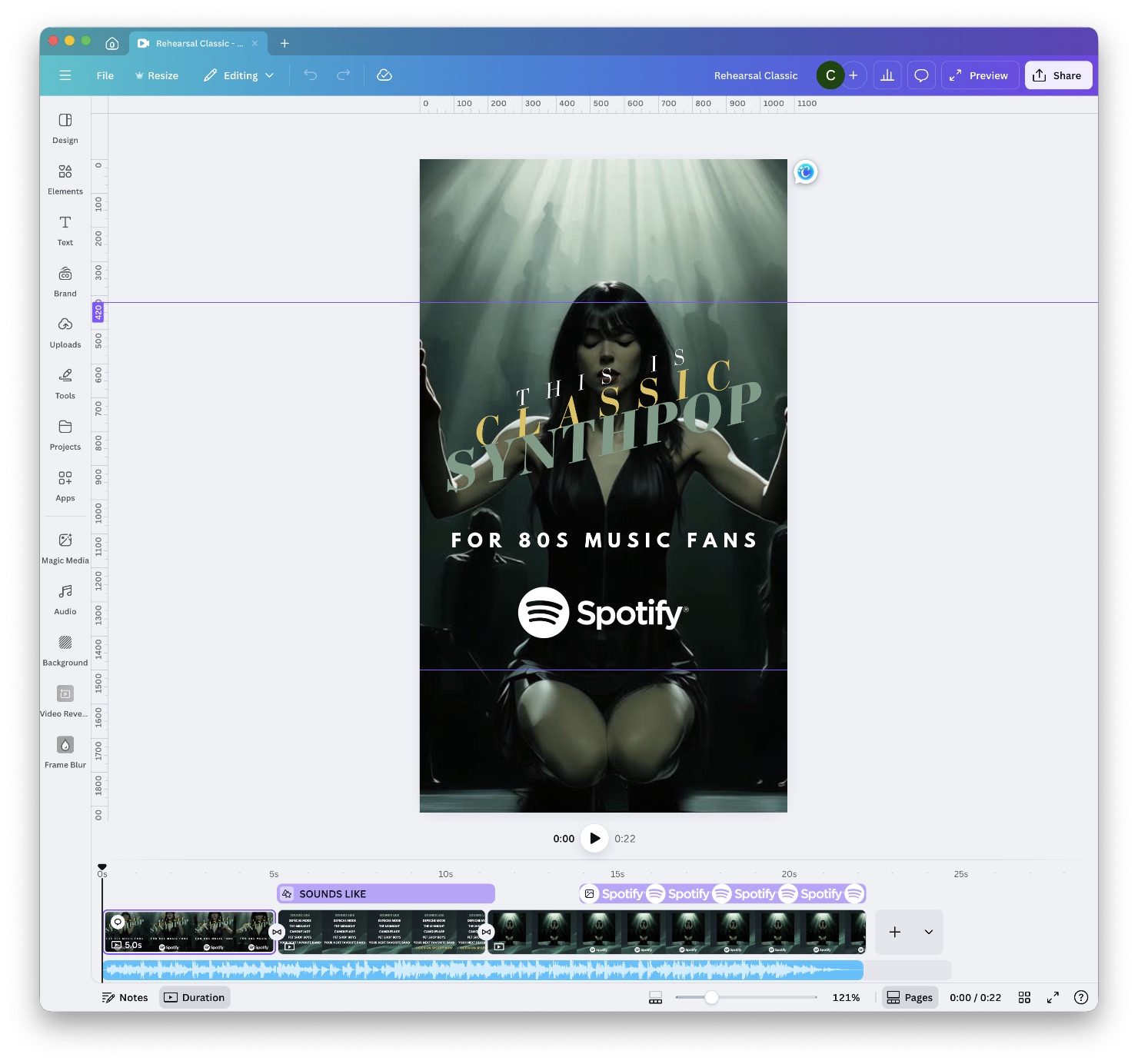
The opening video is my Spotify canvas, which I animated using Kling AI. The rest of the video elements are all stock footage in Canva.
Well now, that was a lot! If you followed along and created your own campaign, please let me know where things could be more clear.
Are you using Meta ads to promote your music? Share your strategies and questions in the comments!
Great stuff!! As always!
Thank you!
I’ve been trying a similar approach with my latest single on a much smaller budget. One thing I’ve noticed is that it looks like the option to post your ads to your feed is no longer available. Thus, do you see a benefit to kicking off a campaign like this using dark posts, and then posting the more successful ads in the ad set, and then possibly adding a “winners” ad set that drives to your live posts? Or do you generally post all of your clips to your feed first and then run ads off the live posts to start with?
I didn’t realize you could post ads to your feed! Most of my ads are clearly intended for cold audiences, so I’m not sure I would do that even if the option were still available. As such, there’s basically zero crossover between by ads and my feed. It’s an interesting approach though!
Hi Brian,
Thanks for your post about creating FB rules. I’m trying for the first time to add a country weight rule to an ad based on your steps. Have a couple quick questions, please.
Firstly, am I correct you start with your usual list of countries. Maybe 50 I’m guessing, and then add a rule to tweak just a few? But the vast majority remain unaffected by the rule.
Secondly, I also use Hypeddit but have come to like their ad creation interface much better than FB, although one is limited to only 3 videos.
I’m pretty sure you are using Hypeddit to create a smart link and then switch to FB manager for ad creation.
I would think it is possible to start with Hypeddit for ad creation and then, once uploaded, go to FB manager for editing and add the country weight rule immediately after Hypeddit uploads the ad. Is this a viable way to go?
Lastly, on a different topic, I have found my results from FB ads have gone down by a noticeable amount since FB has done away with selecting individual artists for interests. I write mostly jazz and they now offer only “jazz music” which is way to broad, rather than, say, Pat Metheny or Steely Dan as examples of what they used to offer. Just curious if in your genre you have noticed a drop off, as well.
Many thanks for being there.
Regards,
Phil (The Weather Channel guy).
Hey Phil!
My list is 34 countries. There’s no need to add value rules right off the bat. You can run the campaign and if you’re happy with the country spread, you’re good to go! In my case it’s mainly a way to get more US and less Brazil and Mexico, without splitting them into separate ad sets.
As for using Hypeddit, I really don’t know. You’d have to see how the campaigns you create there are configured in Ads Manager. Personally I wouldn’t take the risk. Better to just do it all in Ads Manager. Despite the annoyances, you’ve got far more control.
If I’m remembering correctly, you’ve got 3 videos but they’re really just a static animation. Worse, you’ve only got one headline: “New music for fans of X.” You’re really not giving Meta enough to work with. There’s no harm in filling out all the headline, text, and description fields, especially since it sounds like you’re using FB placements where they’ll actually come into play. And throw up more videos. Three videos x three song parts = nine ads. More is better!
I haven’t used interest targeting since I can remember and my results have only gotten better. “Jazz music” is just a starting point assuming you’re using Advantage+ Audience. You could enter psychology stuff like I did and Meta would find your fans, as long as you’re not actively getting in the way.
Hey Brian,
So appreciate you taking the time to respond.
I just happened to go to my original post and saw your response. Thought there might be an email flag. But going forward, will check the post, easy enough to do.
I have been running both Hypeddit and FB mgr. ads. And I do populate the ads with headlines and text fields. All my ads have video vs static images, except for one ad. Maybe you saw God Bless the Child Reimagined where I did use just photos.
I did run an ad recently with 16 different clips. It was sort of a monster but glad to hear you feel it is worth it.
There were so many problems uploading these clips as Manager can show them uploaded and then later produce error messages and have to start over. I also create both horizontal and vertical clips which is time consuming. And upload a thumb. Maybe I don’t need to create the verticals or the thumbs for that matter. I think your thumbs look fantastic, btw.
I haven’t been using advantage +Audience but sounds like that might increase results.
Would be interested to know what you are referring to about adding psychology stuff.
Not sure what that means.
Lastly, sounds like you aren’t encountering the kind of bugs I have while using Manager.
Anyway, if you have time, would love to hear back. But if you’re swamped I more than understand.
Thanks for being there Brian. So much appreciated,
Phil
I’m always happy to help Phil! I get email notifications of replies, but maybe it’s not working for everyone.
I confess I didn’t know I could upload thumbnails! I’ll have to look at that more closely next time. I guess I figured that the videos play automatically on IG, but maybe that’s not the case, or maybe just not the case on FB.
Sorry for the confusion about the psychology stuff. I was referring to my campaign in this post where my winning ad set targeted stuff like self-awareness and well-being – nothing musical at all. With Advantage+ Audience, it ended up finding the conversions anyway.
As for bugs, I definitely see my fair share. Oftentimes when I upload videos it gives me a processing error, but if I wait a minute or two and refresh, all the videos are there and able to be used. I also have an issue where I try to type the ad name but can only type a single letter before having to click the text field again to enter the next one. Sometimes a refresh helps there too.
Can you do a rise active listener campaign review?
I’ll consider it, though it looks like it’s just a Meta ads campaign, and I doubt it could beat my own!